Unblur videos, sharpen details, and upscale resolution by up to 400%. Give your old footage and low-quality clips a stunning HD makeover. 100% Automatic.
🔒 Secure Processing: Your videos are encrypted and auto-deleted after processing.
Drag & Drop
MP4, MOV supported • Max 500MB
No result yet
Upload a video and click 'Upscale Video'
AI-powered super resolution and denoise for clearer footage.
.png)
Drop MP4/MOV to analyze duration and prepare for upscaling. Our AI detects quality issues automatically.
.png)
Click the 'Upscale Video' button and let our AI enhance your video automatically. No manual settings needed.
.png)
Get a clean, upscaled video ready for editing and sharing. Compare before/after instantly.
From family memories to viral clips, our AI upscaler handles it all.
Old Video Restoration
Bring dusty VHS tapes and old phone videos back to life. Remove noise and sharpen faces to preserve your precious memories in HD.
Anime Upscaling
Upscale classic anime from 480p to 4K without artifacts. Our AI creates crisp lines and smooth colors specifically for animation.
Social Media Fix
Downloaded a low-res video from TikTok or Instagram? Upscale it instantly for reposting or editing without the pixelation.
Our deep learning models don't just stretch pixels—they intelligently reconstruct lost details using state-of-the-art neural networks.
Upscale low-resolution videos using advanced neural networks that add real details intelligently.
Intelligently remove grain and digital noise from low-light footage while preserving natural texture.
Reconstruct plausible details in hair, skin, and textures that were lost in compression.
Enhance faded colors and fix white balance issues in old or poorly lit footage.
Video quality fixed? Now try swapping the faces! AI Video Face Swap
No expensive hardware. No complex setup. Just instant results.
| Feature | Best ChoiceFaceswap-ai.io | Desktop Software (Topaz/Adobe) |
|---|---|---|
Processing Speed | Fast Cloud Rendering | Slow Local Rendering (Hours) |
Hardware Required | No GPU Needed | Expensive GPU Required |
Ease of Use | 1-Click Online | Steep Learning Curve |
Cost | Affordable / Free Trial | Expensive License ($200+) |
Installation | None (Browser) | Large Download + Setup |
Updates | Always Latest AI | Manual Updates |
Quality-focused upscaling powered by modern AI.
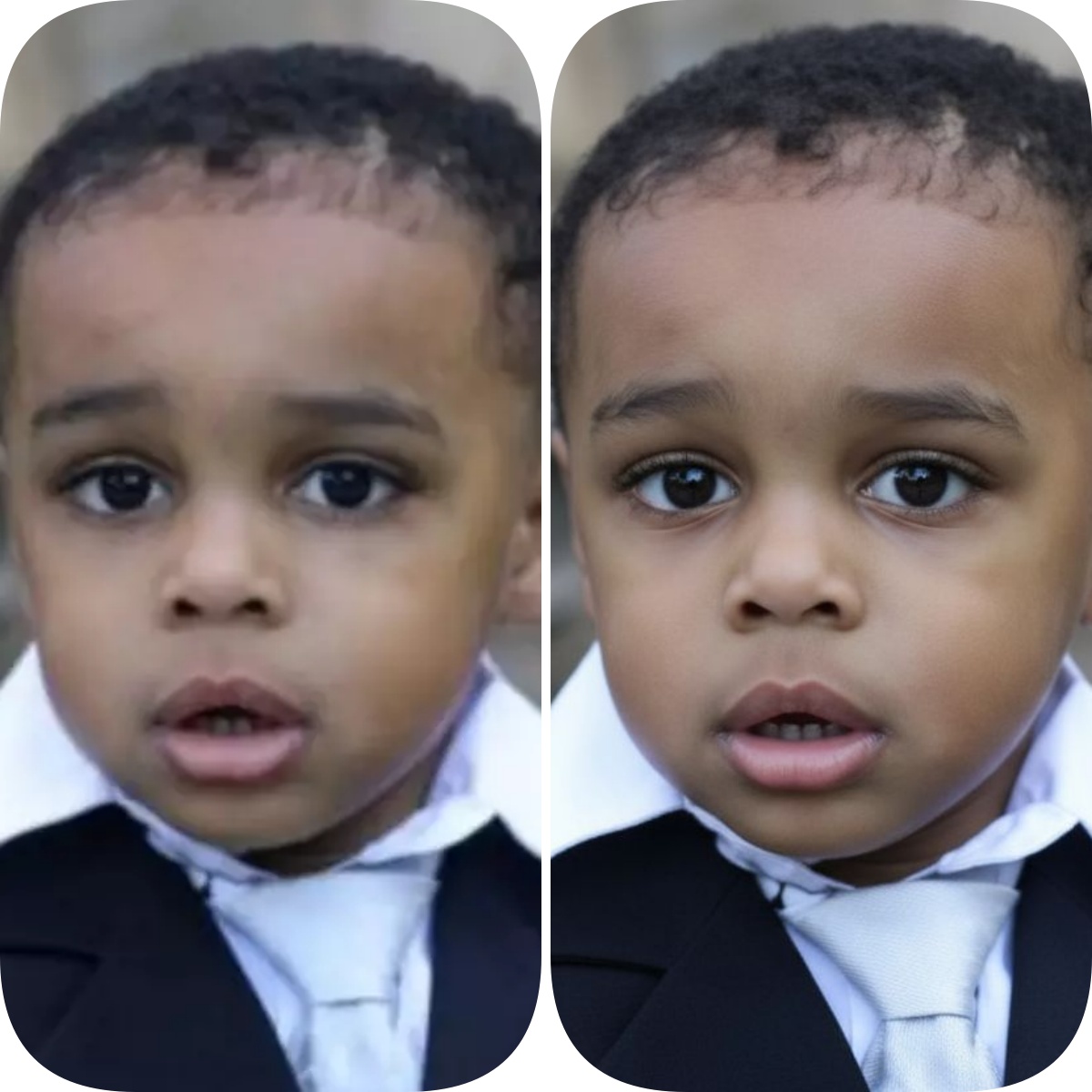
Upscale footage while minimizing blur and preserving contrast. Transform low-quality clips into stunning HD quality.

Reduce compression artifacts and low-light noise while keeping natural texture. Perfect for old or grainy footage.
Filmmakers, editors, and marketers rely on our upscaler.
Turned grainy wedding footage into clean, shareable videos. My clients couldn't believe the difference!
Alex Rodriguez
The AI upscale + denoise kept product edges crisp for our store videos. Huge quality improvement.
Mia Peterson
Reduced mobile noise without the plastic look—our reels pop now. Essential tool for content creators.
Sam O'Neal
Low-light wedding footage cleaned up beautifully—faces look natural even in candlelit scenes.
Nadia Martin
Perfect for app demos—text and UI stay sharp after upscaling. Great for product videos.
Ryan Tyler

Transform grainy, blurry footage into stunning HD quality. Our AI does the heavy lifting—just upload and watch the magic happen.